99Exch App — Bet From Your Phone on Android or iPhone With the Same Official User Name
Want 99Exch on your phone? Android owners install the 99exch app from the "Download .apk" button on the login screen, iPhone owners pin a working address to the home screen through Safari, and anyone else types /m/login after that address. The desk-issued User Name and Password opens all three.
Android app icon, iPhone home-screen shortcut or a phone browser: each route lands on this same pair of fields. Lost the pair? The WhatsApp desk on +91 81097 11726 resets it. Adults 18+ only.
99exch App in One Answer: The Official Phone Routes
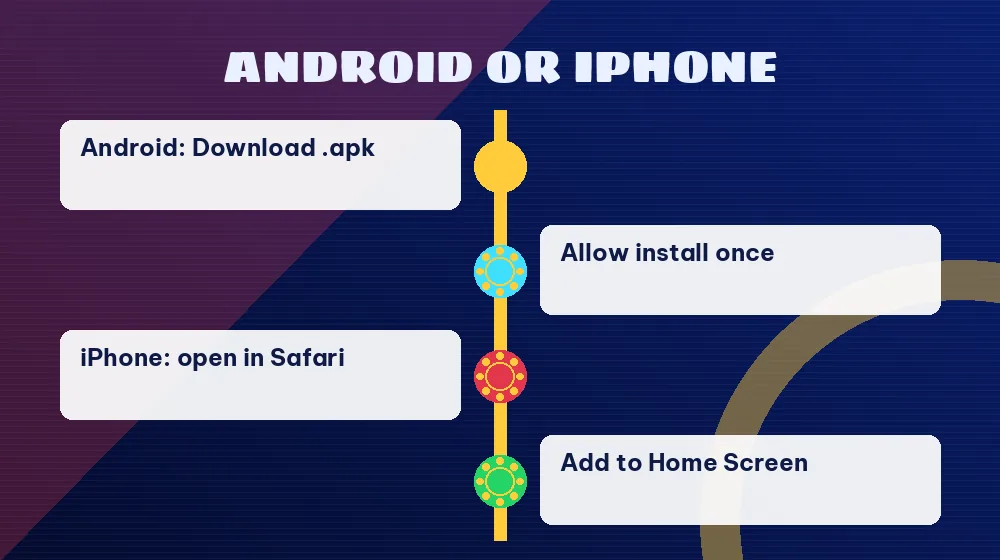
Short version first. On Android, the 99exch app is a real installed app: you take the file from the "Download .apk" button under the official login card, allow the install once, and from then on 99Exch opens from an icon in your app drawer. On an iPhone there is no app at all, so the trick is a Safari shortcut that sits on the home screen and behaves like one. Any other phone, or a borrowed one, can simply open the /m/home or /m/login path after a working address and get the phone layout of the same lobby.
Three doors. One account. The User Name and Password that the WhatsApp desk gave you work on every one of those routes, and the balance you see inside does not change with the door you used. People who search "99 exchange app" are usually after exactly this: a way to keep 99Exch one tap away on the phone without typing an address every evening. If you have not installed anything yet, the download itself (where the button sits, the one-time Android permission) is covered on the 99exch apk page; this page picks up after that, with what daily use on a phone looks like.
A note on names, because the spelling causes trouble. "99exch app", "99 exchange app" and "99exchange app" all point at the same brand. The Play Store, though, shows a listing called MY 99 EXCH that has nothing to do with the 99Exch login screen, which is why the install route matters more than the name you typed (more on that in the tip below).
Three Easy 99Exch App Routes Compared on Real Phones
Each route needs something slightly different from your phone and opens in a slightly different place. The table puts the 99Exch options next to each other so you can pick the one that fits the handset in your pocket.
Route
What your phone needs
Where 99Exch opens
Who it suits
Android app
The file from the "Download .apk" button on the login screen, plus a one-time "install unknown apps" allowance for the browser you used
From its own icon, straight to the LOGIN card
Anyone on Android who opens 99Exch most days
iPhone shortcut
Safari and a working address; there is no iOS app to install
From a home-screen icon that loads the address you saved
iPhone owners who want one tap
/m/ phone path
Any phone browser and a working address followed by /m/home or /m/login
In a browser tab, already in the phone layout
Borrowed phones, a quick check, or a blank app screen
Reading the table from the bottom up is probably the most useful way to see it. The /m/ path needs nothing installed, so it is the fallback for everything else; the iPhone shortcut is really that same browser view with an icon in front of it; and the Android app is the only route where an actual file goes onto the phone, which is also why it is the only one with a permission prompt. All three ask for the same case-sensitive User Name and Password, so a password that fails in the 99Exch app will fail on the /m/login path too, and the fix in both cases is the desk, never a second account.
One more difference people miss. Addresses change. The 99Exch mirrors that answered on 20 October 2026 were 99exch.red, 99exch.live, 99exch.win, 99exch.green and 99exch.black, all serving the same login app, while 99exch.com gave no answer to a plain request that day. An iPhone shortcut or a /m/ bookmark is tied to whichever address you saved it from, so when that ending gets blocked by an Indian ISP the icon simply opens nothig, and you rebuild it from a working ending. The 99exch live login page tracks that address side in more detail.
Safe iPhone Steps for a 99Exch App Icon on the Home Screen
Searching the App Store for 99Exch leads nowhere, because no iOS build exists. Safari covers the gap, and the four taps below take about as long as reading them.
Load a live 99Exch mirror inside Safari, not Chrome
Use Safari itself, since the Add to Home Screen option this relies on lives in its share sheet. Type a working 99Exch ending, such as 99exch.live or 99exch.win, and wait until the LOGIN card with the User Name and Password fields has fully appeared. If you prefer the phone layout from the start, add /m/login after the address before you save it.
Tap the share button for the quick 99Exch shortcut
The share button is the square with an arrow pointing up, in Safari's toolbar. It opens the share sheet, the same sheet you would use to send a link to someone. Scroll the list of actions downward; the option you need is usually below the row of contacts and apps.
Pick Add to Home Screen, then call the shortcut 99Exch Login
Tap "Add to Home Screen". iOS proposes a name taken from the page, and you can change it to something you will recognise, for example 99Exch, before tapping Add. The new icon appears on your home screen next to your other apps.
Tap the fresh 99Exch icon for a fast first login
Leave Safari. From the home screen, one tap on the icon brings up the 99Exch card in a window of its own; enter the User Name, then the Password, letter for letter with capitals intact, and press Login. What loads next matches the laptop lobby.
Strictly speaking, this icon is a bookmark with better manners: it opens the 99Exch address in a clean window without the usual address bar clutter, which feels close enough to an app that most iPhone users stop thinking about the difference after a day or two, and the login, the lobby and your balance are identical to what Android users see.
Which address should the icon save? Either works. A shortcut saved on the plain ending opens the full LOGIN card with the "Download .apk" and "Contact On Whatsapp" buttons below it; one saved on the /m/login path skips straight to the phone layout of the 99Exch lobby after you sign in. Many iPhone users keep both, one from 99exch.live and one from 99exch.win, so that a block on one ending leaves the other icon working. Two icons, zero extra setup.
Ignore the "Download .apk" button on an iPhone, by the way. That file is built for Android, iOS cannot install it, and tapping it achieves nothing useful; the home-screen icon is the whole iPhone version of the 99Exch app.
Trusted 99exch App and 99 Exchange App Facts on One Card
Searches for the 99exch app, the 99 exchange app and the 99exchange app all end at the same official login card, and the points below are the ones this page covers for phone users after the setup is done.
How the 99exch app route on this page starts on Android
Tap "Download .apk" under the LOGIN card on a working 99Exch address.
Allow "install unknown apps" once for that browser.
Tap the new icon in the app drawer; the LOGIN card comes up first, ready for the pair the desk sent.
Which 99 exchange app route fits which phone on this page
Phone
Route on this page
Android
Installed 99exch app from the login screen file
iPhone
Safari Add to Home Screen icon
Any phone
/m/home or /m/login after a working address
Why the Play Store listing named on this page is a different product
If the icon on your Android phone came from a store, remove it. Whatever name it shows, it was not built from the 99Exch "Download .apk" file, so reinstall from that button on a working address and sign in with the pair you already have.
What stays the same on every phone route described here
One ID, one balance, the same sports, exchange and card games, and the same WhatsApp desk for resets, deposits and withdrawals.
Daily 99Exch App Use on Android: What You Really See
Once the Android app is on the phone, a normal 99Exch evening follows the same pattern every time. Here is what each part does.
The app icon
It sits in the app drawer like any installed app; tap it and 99Exch opens without a browser tab, which also means no address to type and no search results to scroll through.
The same LOGIN card
The first screen is the card you know from the website: User Name, Password, a "Login" button and a "Login with Demo ID" button, with the reCAPTCHA notice underneath. Both fields are case-sensitive, so type them exactly as issued.
Demo ID on the phone
Want to learn where things sit on a five-inch screen before using your real ID? The second button on the card loads a practice lobby showing 0.00, with no money in it and no payout from it.
The full-screen promo after login
Expect this one every time. A full-screen 99Exch screen pushing the APK ("Download APK, once & use forever") covers the lobby the moment the Login button does its job, along with a line saying links change and fake ones are around. App users already have the file, so treat it as a reminder and close it; the lobby waits behind it.
The lobby on a phone screen
Balance and Exposure at the top, a Rules link, search and your username menu; a scrolling notice line; the sports bar from Cricket and Football across to Kabaddi and Politics; the house card games such as TP T20, Andar Bahar and Worli Matka; and the market list with INPLAY, Cricket, Football and Tennis tabs.
The WhatsApp bubble
A 24x7 customer-support WhatsApp bubble sits bottom-right of the lobby. That is where a new ID, a password reset, a deposit or a withdrawal request starts, through the desk on +91 81097 11726.
What surprises people is how little changes. The 99Exch app is the same lobby in a frame of its own, with the same columns (Game, 1, X, 2, each with a back cell and a lay cell) and the same LIVE, VIRTUAL and PREMIUM filters, so anything you learned on the website applies, and anything that confuses you on the phone will look exactly the same on a laptop. Small screen, same rules.
A worked example helps. Say you sign in on the Android app at home, check a cricket market from the upcoming-match strip, then later borrow a friend's phone; you would type a working address plus /m/login there, enter the same User Name and Password, and see the same balance and exposure you left behind. No transfer, no second ID, no sync step.
Read the notice notice line on the phone, too. It scrolls across the top of the 99Exch lobby carrying the brand's announcements, and on a narrow screen it is easy to treat as decoration and scroll past, even though that strip is the place where the brand posts its own announcements for everyone holding an ID.
99 Exchange App on Play Store? The Genuine 99Exch Answer
The same login card carries a third button, "Share This Apk to Friend", and that is the cleaner way to pass the 99Exch app to someone: it shares the file from the official screen instead of a forwarded link of unknown origin, which matters because the brand itself warns, right after login, that fake links exist and that its links change.
99Exch App Shows a Blank Screen? Fast Fixes That Work
A blank 99Exch app screen is almost always an address problem rather than a phone problem. Indian ISPs block betting domains from time to time, and when the address the app or your shortcut points at gets blocked, the screen just stays empty. Two moves cover nearly every case.
Switch the 99Exch address or use the quick /m/ path
Open a phone browser and try a different mirror ending: .red, .live, .win, .green or .black all served the same login app on 20 October 2026.
Got the card on 99exch.win? Put /m/login on the end of that same address next time for the phone-sized lobby; the 99exch com m home page lists both paths.
Sign in with the same User Name and Password. If your balance is there, the account is fine and only the old address was the issue.
iPhone shortcut dead? Delete it and save a new one in Safari from whichever ending loaded a moment ago.
Ask the 24x7 99Exch desk when the login itself fails
Fields load but the password is refused: check capitals first, since both fields are case-sensitive.
Password refused with the capitals checked? Reinstalling the 99Exch app changes nothing here; a new password only comes from the WhatsApp desk on +91 81097 11726.
Every address you try stays blank: tell the desk which endings you tried, so they can point you to a current one.
Need the sign-in basics on a computer instead? The 99 exchange login page covers the card field by field.
Hard to say which fix you will need before you try, so go in that order: address first, then the /m/ path, then the desk. In practice the first step solves it most of the time, because a blank 99Exch app is the phone loading a blockd address and showing you nothing, and a reinstall on its own changes little if the address is still the problem. Wait, one exception: if the app came from a store or a forwarded link, reinstall from the login screen anyway. Then retry.
Two phones, two routes, one 99Exch User Name.
99Exch App FAQ: Clear Replies on iPhone, Play Store and Blank Screens
Can I get the 99exch app on an iPhone?
Only as a home-screen icon. Apple users of 99Exch keep a Safari shortcut in place of an installed app: open a working address, tap the square share button, pick Add to Home Screen and rename it. Saving it from the /m/login path gives the phone layout on every tap; the Download .apk button is for Android only.
Does the 99exch app use my existing ID?
Yes, the app takes the same User Name and Password the WhatsApp desk issued you. One ID opens sports, exchange and card games on the Android app, the iPhone shortcut and the /m/ phone paths alike, with one balance. Type both exactly as issued, since the fields are case-sensitive.
Is the 99 exchange app available on the Play Store?
Not as anything linked to your 99Exch account. Judge an install by where it came from: a tap on Download .apk under the LOGIN card of 99exch.live or another working mirror gives the genuine file, while MY 99 EXCH on Google Play or a copy from an APK-mirror site belongs in the bin.
Why does a full-screen promo open after I log in to the 99exch app?
Every sign-in triggers it, app users included. The 99Exch lobby greets each login with a Download APK, once and use forever screen plus a note that links change and fake ones circulate. With the app already installed you can dismiss it; your balance, the markets and the bottom-right WhatsApp bubble sit underneath.
What should I do if the 99exch app shows a blank page?
Usually the address behind the app is blocked, so swap the address before anything else. Open 99exch.live or 99exch.win in a phone browser, add /m/login, and sign in; if your balance shows up, the account is fine. Blank on every ending you try? Send the WhatsApp desk on +91 81097 11726 the list of endings.
Can I use 99Exch in a phone browser without the app?
Yes. Type a working address followed by /m/home or /m/login in any phone browser and the phone layout of the same app opens. You sign in with the same ID and see the same balance, so the browser route is a good fallback on a borrowed phone or when the app screen stays empty.